Connectivity Objects
Connectivity objects in ADS Python represent the logical and physical connections between components. They include Nets, Terms, Pins, InstTerms, and InstPins.
Net
A Net represents the logical connectivity within a design, the
electrical path in a circuit. A collection of wires or interconnects that carry the same signal is
considered to be on the same net. Nets connect to Terms and InstTerms.
ADS Python supports multiple types of Nets:
ScalarNet: A single-bit net that is not part of a BusNet and
does not use bus-name syntax. Generally speaking, ScalarNet is the most common type of Net.
BusNet: A multi-bit Net that shares a common base name and uses
bus-name syntax (e.g. “A<0:7>”). A BusNet can be viewed as a collection of single-bit logical connections.
BusNetBit: A single-bit of a BusNet and uses bus-name syntax
(e.g. “A<0>”).
BundleNet. A multi-bit Net that does not share a common base
name, but instead uses comma separated names for each bit (e.g., “A, B, C”)
The following image shows a schematic with the net, Net1. The three wires and the InstTerms they are connected to are all on Net1.

Term
A Term (terminal) represents a logical connection point for a design.
Nets associated with the terminals are logically made available to the next higher level in a design hierarchy.
Pins associated with a Term represent the physical connection point for the design.
Pin
A Pin represents a physical connection point of terminals to
nets. A term can have multiple pins, where multiple physical connections can correspond to a
single logical connection. A pin is associated with one or more phsyical figures and holds information
on the term it represents and physical properties, such as its location and angle.
def adding_a_pin_to_a_design(design: db_uu.Design) -> None:
    with de.db.Transaction(design) as transaction:
        net = design.find_or_add_net("P1")
        term = design.add_term(net, "P1")
        layer_id = design.create_layer_id("cond")
        dot = design.add_dot(layer_id, (0.0, 0.0))
        # Pins are associated with a term and a pinfig, often just a dot
        design.add_pin(term, dot)
        transaction.commit()
InstTerm
An InstTerm represents a logical connection point between
a net and a term in the master of an instance. An InstTerm with a corresponding Term in the master
design is considered bound to the term, and is bound by either number or by name. All bound InstTerms
of an instance must be bound the same way (either all by number or all by name). An InstTerm that does
not have a corresponding Term in the master design (if, for example, the master design was modified
and the term removed after an instance of the master was placed into a parent design) is said to be
unbound.
def checking_inst_term_properties(design: db_uu.Design) -> None:
    for instance in design.instances:
        for inst_term in instance.inst_terms:
            if inst_term.is_bound:
                # Obtain either the number or name from the bound InstTerm
                if inst_term.is_numbered:
                    print(f"Term is numbered: {inst_term.term_number}")
                else:
                    print(f"Term is named: {inst_term.term_name}")

            # More than one InstPin may be associated with an InstTerm:
            for inst_pin in inst_term.inst_pins:
                print(inst_pin)

            # Obtain the net from the InstTerm, which may be None
            net = inst_term.net
            print(net)
InstPin
An InstPin represents a pin in the master design of an instance
mapped into the parent design. When a wire is connected to an InstPin, the net associated with the
wire connects to the InstTerm associated with the InstPin.
def connecting_a_wire_to_an_inst_term(design: db_uu.Design) -> None:
    # Create an instance of a resistor symbol and place it in the schematic at (0, 0)
    cellview_ref: de.CellviewRef = de.CellviewRef("ads_rflib", "R", "symbol")
    r1: db_uu.Instance = design.add_instance(cellview_ref, (0, 0), name="R1")
    r2: db_uu.Instance = design.add_instance(cellview_ref, (3, 0), name="R2")

    # Anytime connectivity is modified, it should be done within a transaction. Committing a transaction
    # will check, and potentially repair, the design for connectivity errors.
    with de.db.Transaction(design) as transaction:
        # Note: You can use the snap_point property for making connections
        r1_snap_point = r1.inst_pins[1].snap_point
        r2_snap_point = r2.inst_pins[0].snap_point
        assert r1_snap_point is not None and r2_snap_point is not None
        # Connecting a wire to an InstPin will propagate the Net to the InstPin
        wire = design.add_wire([r1_snap_point, r2_snap_point])
        # Setting the wire label will also set its net, which will propagate to the InstPin
        wire.add_wire_label("N1")
        assert r1.inst_pins[1].net is not None and r1.inst_pins[1].net.name == "N1"
        assert r2.inst_pins[0].net is not None and r2.inst_pins[0].net.name == "N1"

        transaction.commit()
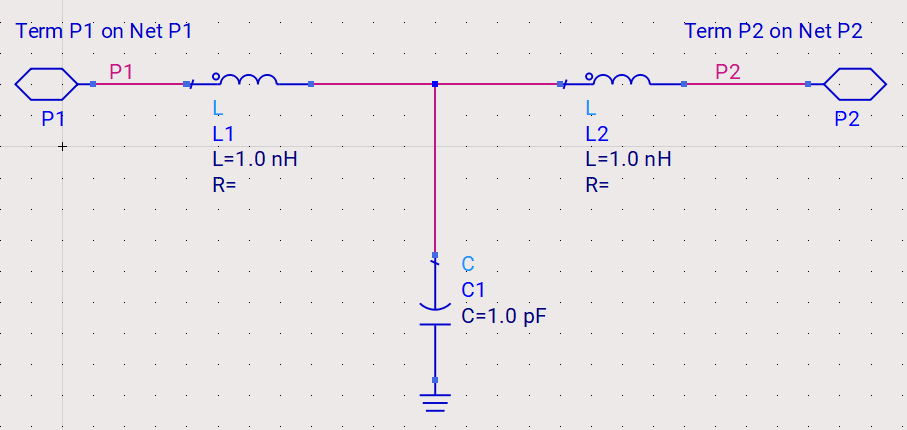
In the following image, we have a schematic with two pins, each of them connecting to a component on a net. The P1 Term is connected to the P1 Net and the P2 Term is connected to the P2 Net.
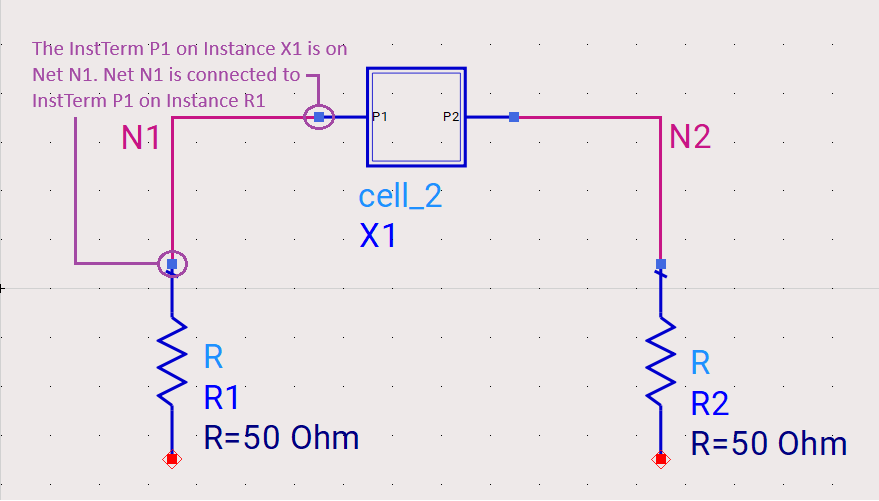
In this image, the symbol View of the above design was placed into a parent design as an Instance. Connections to the pins in the master design are made through the corresponding InstTerms in the parent design.
The P1 InstTerm is the connection point between the Net on the parent design and the Term on the master design of the instance.