
Padstacks and Vias
The following example shows how to create a padstack template, add it to the technology of a library, and save it.
def creating_a_padstack(lib1: de.Library, lib2: de.Library) -> None:
    # A padstack is part of a library's technology and requires a substrate.
    assert lib1.has_tech
    assert lib2.has_tech
    assert lib1 != lib2
    # A padstack can be created two different ways.
    # The first way creates the padstack directly in the technology of a library
    padstack = lib1.tech.create_padstack("Example Padstack")
    # The library property is a reference to the library the padstack is a part of
    assert padstack.library == lib1

    # The second way creates a padstack that is not associated with a library and allows
    # you to add it to one or more libraries later
    padstack_no_library = tech.pads.Padstack("Another Example Padstack")

    # Adding a padstack to a library will not set the library property of the padstack
    lib1.tech.padstacks.add(padstack_no_library)
    assert padstack_no_library.library is None

    # It is not until the padstack has been retrieved from the library that the library
    # property is set.
    padstack_from_lib1 = lib1.tech.padstacks["Another Example Padstack"]
    assert padstack_from_lib1.library == lib1

    lib2.tech.padstacks.add(padstack_no_library)
    padstack_from_lib2 = lib2.tech.padstacks["Another Example Padstack"]
    assert padstack_from_lib2.library == lib2
    assert padstack_from_lib1.library == lib1

    # Save your padstack to the technology
    lib1.tech.save_padstacks()
    lib2.tech.save_padstacks()
The following example shows how to delete a padstack template from the technology of a library.
def deleting_a_padstack(library: de.Library) -> None:
    assert library.has_tech
    try:
        # If this library already has Example Padstack, retrieve it, otherwise create it
        # In addition to retrieving the padstack from the Library.tech.padstacks collection,
        # you can retrieve it by name using the Tech.get_padstack_from_lib function
        padstack = de.Tech.get_padstack_from_lib(f"{library.name}:Example Padstack")
    except RuntimeError:
        padstack = library.tech.create_padstack("Example Padstack")

    padstack = library.tech.padstacks["Example Padstack"]

    # TODO: Fix API to accept Padstack in the collection's find method?
    assert padstack in library.tech.padstacks
    # Deleting a padstack is as simple as removing it from the padstacks collection
    del library.tech.padstacks["Example Padstack"]
    assert padstack not in library.tech.padstacks

    library.tech.save_padstacks()
The following example shows how to build up a padstack template.
def building_up_a_padstack(library: de.Library) -> None:
    # A padstack is part of a library's technology and requires a substrate.
    # This example does not cover creating a substrate, but the example padstack
    # is compatible with the default settings of the Create PCB Technology
    # option when setting up the layout technology for the first time.
    assert library.has_tech
    # Create a padstack
    padstack = library.tech.create_padstack("Example Padstack")

    # Drill attributes can be set in different ways, by modifying the drill object directly
    padstack.drill.drill_type = tech.pads.DrillType.SQUARE
    padstack.drill.drill_size = "10 mil"
    padstack.drill.rotate_degrees = "45"

    # Or by initializing a new drill object and assigning it to a padstack
    drill = tech.pads.ViaPadDrill(tech.pads.DrillType.SQUARE)
    drill.drill_size = "10 mil"
    drill.rotate_degrees = "45"
    padstack.drill = drill

    # The drill_size property is a LengthValue object, which expects a string with units
    # If no units are specified, the value will be in meters
    assert padstack.drill.drill_size.value == "10 mil"
    assert padstack.drill.drill_size.mks() == 0.000254  # 10 mil in meters

    # The Padstack layer, drill, and expansion properties are references to their corresponding objects
    drill.drill_size = "25 mil"
    assert padstack.drill.drill_size.value == "25 mil"

    # Create a mask expansion -- there are string equivalents to the enum values, so
    mask_expansion = tech.pads.MaskExpansion("TopAndBottomBoard", "5 mil")
    assert mask_expansion.affects_layers.value == tech.pads.MaskExpansion.AffectsLayers.TOP_AND_BOTTOM_BOARD.value
    # is equivalent to
    mask_expansion = tech.pads.MaskExpansion(tech.pads.MaskExpansion.AffectsLayers.TOP_AND_BOTTOM_BOARD, "5 mil")
    assert mask_expansion.affects_layers.str == "TopAndBottomBoard"
    paste_expansion = tech.pads.MaskExpansion(tech.pads.MaskExpansion.AffectsLayers.NONE)  # Same as "None"
    assert paste_expansion.affects_layers.str == "None"

    padstack.mask_expansion = mask_expansion
    padstack.paste_expansion = paste_expansion
    # Like the drill, the expansion properties are references to their corresponding objects
    mask_expansion.expansion = "2.5 mil"
    assert padstack.mask_expansion.expansion.value == "2.5 mil"

    # The default layer entry holds the pad properties for all layers that are not specifically matched
    # with a LayerMatcher assigned to a PadLayerEntry in the pad_layers collection
    default_layer_entry = tech.pads.PadLayerEntry()
    default_layer_entry.pad = tech.pads.SquarePad("50 mil")
    default_layer_entry.thermal = tech.pads.Thermal("Straight")
    default_layer_entry.thermal.clearance = "5 mil"
    default_layer_entry.thermal.connection_width = "2 mil"

    padstack.default_pad_layer = default_layer_entry

    assert padstack.default_pad_layer.thermal
    assert padstack.default_pad_layer.thermal.clearance.value == "5 mil"

    # Set the default clearance to None so the clearance will use a clearance rule
    clearance = tech.pads.Antipad()
    clearance.mode = tech.pads.Antipad.Mode.NONE
    default_layer_entry.clearance = clearance

    # Create a new layer entry for the top Conductive layer. This entry will override the default layer entry
    # for this layer
    top_conductor_layer_entry = tech.pads.PadLayerEntry()
    top_conductor_layer_entry.layer_matcher = tech.pads.MatchLayerFromTopOfBoard(0, "Conductor")
    top_conductor_layer_entry.pad = tech.pads.CircularPad("75 mil")
    top_conductor_layer_entry.clearance = tech.pads.Antipad()
    top_conductor_layer_entry.clearance.mode = tech.pads.Antipad.Mode.ADD_CLEARANCE
    top_conductor_layer_entry.clearance.expansion = "15 mil"

    # The pad_layers collection consists of all the PadLayerEntry that are not the default
    assert len(padstack.pad_layers) == 0
    # Add the top conductor PadLayerEntry
    padstack.pad_layers.append(top_conductor_layer_entry)
    assert len(padstack.pad_layers) == 1

    # Create a new layer entry for the M5 layer. This entry will override the default layer entry
    # for the M5 layer, but not for any other layers
    m5_layer_entry = tech.pads.PadLayerEntry()
    m5_layer_entry.layer_matcher = tech.pads.MatchLayerByName("M5")
    m5_layer_entry.pad = tech.pads.SquarePad("50 mil")

    # The M5 entry will have clearance in the shape of an octagon
    clearance = tech.pads.Antipad()
    clearance.mode = tech.pads.Antipad.Mode.CUSTOM
    clearance.custom_antipad = tech.pads.OctagonalPad("100 mil")
    m5_layer_entry.clearance = clearance

    # Add the M5 PadLayerEntry
    padstack.pad_layers.append(m5_layer_entry)
    assert len(padstack.pad_layers) == 2

    # PadLayerEntry can accessed by index from the pad_layers collection
    assert padstack.pad_layers[1] == m5_layer_entry
    assert padstack.pad_layers[1].layer_matcher
    assert tech.pads.LayerMatcher.is_name_matcher(padstack.pad_layers[1].layer_matcher)
    assert padstack.pad_layers[1].layer_matcher.name == "M5"

    library.tech.save_padstacks()
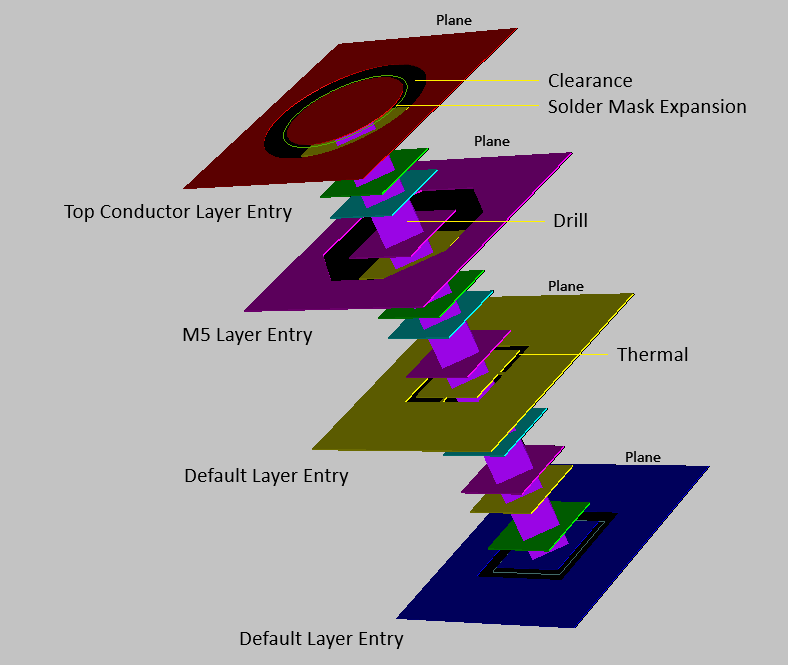
The following image shows a through pad that was placed using the padstack template created in the example above. Planes are added to show the effects of the clearance, thermal, and anti-pad settings.
The following examples show how to place pads and vias into a design.
def place_single_layer_pad(design: db_uu.Design, library: de.Library) -> None:
    lib_name = library.name
    # Padstack created in creating_a_padstack above
    padstack_name = "Example Padstack"
    padstack = library.tech.padstacks[padstack_name]

    # Create a pad with a single layer specified
    # The specified layer will match the relevant PadLayerEntry in the padstack
    # For example, placing a single layer pad in the M5 layer will used the M5 PadLayerEntry
    layer = library.tech.layer("M5")
    m5_pad = design.add_single_layer_pad(padstack, db_uu.LayerId(layer.number), (75, 325))
    assert m5_pad.pad_via_type.value == db_uu.PCBBase.PadViaType.SINGLE_LAYER_PAD.value
    assert m5_pad.pad_layer == layer.number

    # A pad that has been placed in a design is an Instance and can be accessed from the design by name
    assert m5_pad in design.instances and m5_pad == design.instances[m5_pad.name]
    # The padstack template name is the library name and padstack name separated by a colon
    assert m5_pad.padstack_name == f"{lib_name}:{padstack_name}"
    # The pad instance name is "Pad" followed by a number starting from 1
    assert m5_pad.name == "Pad1"
    assert m5_pad.pad_via_type == db_uu.PCBBase.PadViaType.SINGLE_LAYER_PAD
def place_pad_and_via_with_specified_layers(design: db_uu.Design, library: de.Library) -> None:
    # Padstack created in creating_a_padstack above
    padstack_name = "Example Padstack"
    padstack = library.tech.padstacks[padstack_name]

    # The pad placed in the cond layer corresponds to the PadLayerEntry with the
    # MatchLayerFromTopOfBoard(0, "Conductor") LayerMatcher
    top_layer = db_uu.LayerId(library.tech.layers["cond"].number)
    # The pad placed in the M10 layer corresponds to the default PadLayerEntry
    bottom_layer = db_uu.LayerId(library.tech.layers["M10"].number)
    cond_m10_pad = design.add_pad_with_specified_layers(padstack, top_layer, bottom_layer, (200, 325))
    assert cond_m10_pad.top_layer == top_layer.layer
    assert cond_m10_pad.bottom_layer == bottom_layer.layer
    assert cond_m10_pad.pad_via_type == db_uu.PCBBase.PadViaType.BLIND_BURIED_PAD
    assert db_uu.PCBBase.is_pcb_pad(cond_m10_pad)
    assert not db_uu.PCBBase.is_pcb_via(cond_m10_pad)

    # Placing a via with specified layers is similar to placing a pad with specified layers
    cond_m10_via = design.add_via_with_specified_layers(padstack, top_layer, bottom_layer, (200, 200))
    # The via instance name is "Via" followed by a number starting from 1
    assert cond_m10_via.name == "Via1"
    assert cond_m10_via.pad_via_type == db_uu.PCBBase.PadViaType.BLIND_BURIED_PAD
    assert db_uu.PCBBase.is_pcb_via(cond_m10_via)
    assert not db_uu.PCBBase.is_pcb_pad(cond_m10_via)
def place_pad_and_via_with_drill_layer(design: db_uu.Design, library: de.Library) -> None:
    # Padstack created in creating_a_padstack above
    padstack_name = "Example Padstack"
    padstack = library.tech.padstacks[padstack_name]

    # Create pad with the drill layer specified
    cond_m2_layer = db_uu.LayerId(library.tech.layers["cond_M2"].number)
    cond_m2_pad = design.add_pad_with_drill_layer(padstack, cond_m2_layer, (75, 200))
    assert cond_m2_pad.pad_via_type == db_uu.PCBBase.PadViaType.DRILL_LAYER
    assert cond_m2_pad.drill_layer == cond_m2_layer.layer

    # Create a via with the drill layer specified
    m4_m5_layer = db_uu.LayerId(library.tech.layers["M4_M5"].number)
    m4_m5_via = design.add_via_with_drill_layer(padstack, m4_m5_layer, (75, 75))
    assert m4_m5_via.pad_via_type == db_uu.PCBBase.PadViaType.DRILL_LAYER
    assert m4_m5_via.drill_layer == m4_m5_layer.layer
def place_through_pad_and_via(design: db_uu.Design, library: de.Library) -> None:
    # Padstack created in creating_a_padstack above
    padstack_name = "Example Padstack"
    padstack = library.tech.padstacks[padstack_name]

    # Create a through pad
    through_pad = design.add_through_pad(padstack, (325, 325))
    assert through_pad.pad_via_type == db_uu.PCBBase.PadViaType.THROUGH

    # Create a through via
    through_via = design.add_through_via(padstack, (325, 200))
    assert through_via.pad_via_type == db_uu.PCBBase.PadViaType.THROUGH