Creating Custom Menus Using an Addon
Addons in ADS may be implemented in Python and enabled using the App Manager in the Tools menu of ADS.
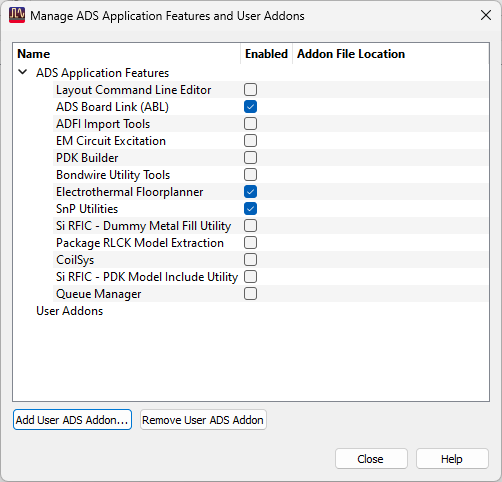
To select an addon that is written in Python, change the file type filter to show Python files and navigate to your addon package:

The following example demonstrates how to create custom menus using an addon implemented in Python.
# Copyright Keysight Technologies 2024 - 2024
"""Addon example that will generate menus based on window type."""

from typing import TYPE_CHECKING

if TYPE_CHECKING:
    from keysight.ads.de.app import Action, Addon, Window, WindowDefinition


def setup_addon(addon: "Addon") -> None:
    ...
    """This is the setup function for the Addon."""

    # Implementation of this method is optional but if you do, DO NOT invoke UI from this function!


def shutdown_addon(addon: "Addon") -> None:
    ...
    """This is the shutdown function for the Addon."""

    # Implementation of this method is optional but if you do, DO NOT invoke UI from this function!

    # Menus and Actions that are generated inside the generate_menu function do not need
    # to be explicitly removed, they will be automatically removed when the Addon is disabled
    # or unloaded (after this function returns).

    # Should you wish to remove menus yourself, you can do so using the Menu.remove_ API's.


def identify() -> None:
    print("My Menu Addon.")


def generate_menu(addon: "Addon", win_def: "WindowDefinition") -> None:
    """Menu generator for the Addon."""
    import keysight.ads.de.app as app

    win_type = win_def.window_type
    # We'll add menus to the main window, layout window, and schematic window
    if (
        win_type == app.WindowType.MAIN_WINDOW
        or win_type == app.WindowType.LAYOUT_WINDOW
        or win_type == app.WindowType.SCHEMATIC_WINDOW
    ):
        # Retrieve the window menu bar and add a new menu and actions under the Tools menu
        menu_bar = win_def.menubar
        assert menu_bar
        tools_menu = menu_bar.find_menu("Tools")
        if tools_menu:

            def add_separator_to_tools_menu() -> None:
                separator = app.Separator()
                tools_menu.add_action(separator)

            # We need to add the menu just once per WindowType we're interested in
            if win_type == app.WindowType.MAIN_WINDOW:
                my_addon_menu = tools_menu.find_menu("My Python Addon Menu")
                # Add a new menu and an action to the Tools menu on the Main Window
                if my_addon_menu is None:
                    add_separator_to_tools_menu()
                    my_addon_menu = app.Menu("My Python Addon Menu")
                    tools_menu.add_menu(my_addon_menu)
                    main_menu_action = app.Action("My Main Menu Action", my_addon_main_menu_handler, None)
                    # The shortcut for the action; functional and displays alongside the action title
                    main_menu_action.shortcut = "Ctrl+O"
                    my_addon_menu.add_action(main_menu_action)

            # For layout and schematic windows, we'll add an action directly to the Tools menu
            elif win_type == app.WindowType.LAYOUT_WINDOW:
                if tools_menu.find_action("My Layout Action") is None:
                    add_separator_to_tools_menu()
                    tools_menu.add_action(app.Action("My Layout Action", my_addon_shared_menu_handler, None))
            elif win_type == app.WindowType.SCHEMATIC_WINDOW:
                if tools_menu.find_action("My Schematic Action") is None:
                    add_separator_to_tools_menu()
                    tools_menu.add_action(app.Action("My Schematic Action", my_addon_shared_menu_handler, None))
            else:
                # not possible
                ...


def my_addon_main_menu_handler(action: "Action", window: "Window") -> None:
    from keysight.ads import ael

    # Display a message box when the menu action is triggered
    ael.call.de_info(f"Shortcut ({action.shortcut}) from {action.name} in {str(window.window_type)}")


def my_addon_shared_menu_handler(action: "Action", window: "Window") -> None:
    from keysight.ads import ael
    from keysight.ads.de import app

    if action.name == "My Layout Action":
        assert window.window_type == app.WindowType.LAYOUT_WINDOW
        ael.call.de_info("Layout window type callback handler called.")
    elif action.name == "My Schematic Action":
        assert window.window_type == app.WindowType.SCHEMATIC_WINDOW
        ael.call.de_info("Schematic window type callback handler called.")
    else:
        # not possible
        ...
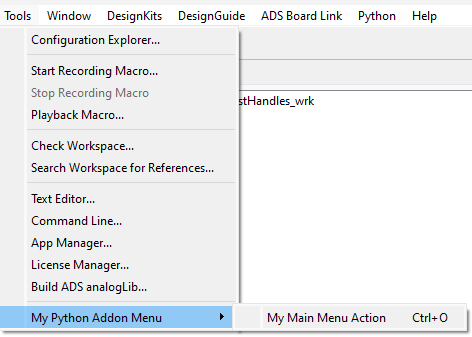
The code above created menus listed in the Tools menu of ADS, as shown below:
While the entirety of your addon does not need to be implemented in __init__.py, its presence is necessary to define a namespace for your module and allows for the export of symbols accessible by other Python modules.
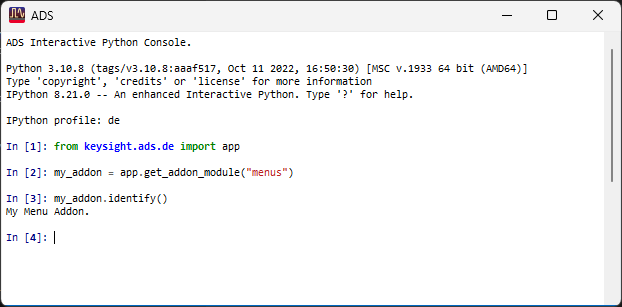
Access to API’s in your module can be done like:
# This code snippet will call the identify() method defined in the menus module above
from keysight.ads.de import app
my_addon = app.import_addon_as_module("menus")
my_addon.identify()