
Using Python in ADS Design Environment
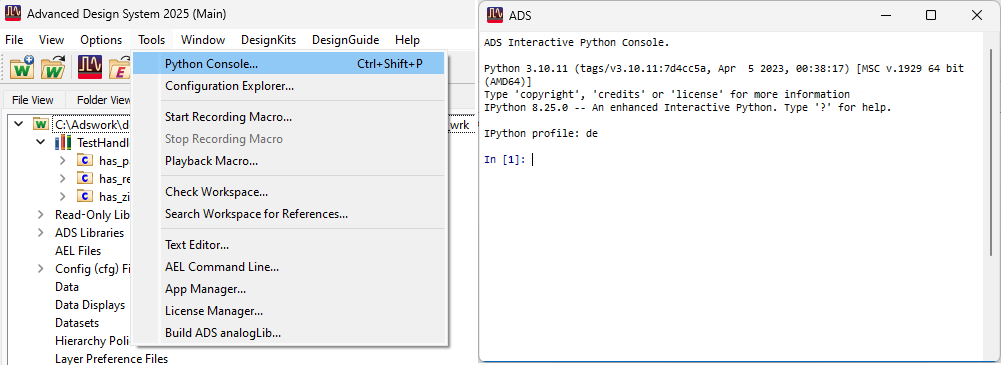
The ADS Design Environment includes an embedded Python interpreter and can be accessed from the Tools > Python Console… top-level menu or by using the Ctrl-Shift-P keyboard shortcut. If the interpreter window is already displayed, the shortcut will bring the window to the foreground.
Jupyter Console
The Jupyter console has both tooltips and tab-completion.
Note
Completion assistance does not pop up automatically. Invoke it by pressing the TAB key.
The Jupyter console supports IPython’s magic commands for IPython. For example:
%clear: clear the current window
%alias: create shortcut commands
%matplotlib inline: render matplotlib plots in the console window
%matplotlib auto: reset the handling of matplotlib plots
Full reference: IPython Magic Commands.
Customizing the ADS UI
Customization of ADS, like adding menus, can be done using the keysight.ads.de.app module.
Creating user interfaces, like dialog windows, can be done using PySide2.
# Copyright Keysight Technologies 2023 - 2023
from typing import Union

from PySide2.QtWidgets import QDialog, QPlainTextEdit, QVBoxLayout, QWidget


class Form(QDialog):
    def __init__(self, parent: Union[QWidget, None] = None):
        super().__init__(parent)
        self.setWindowTitle("My Customization Example")
        layout = QVBoxLayout()
        editor = QPlainTextEdit()
        editor.setPlainText("Text")
        layout.addWidget(editor)
        self.setLayout(layout)


form = Form()
form.show()
Note
PySide2 is installed and available when using Python inside ADS.
Add-ons
Python-implemented addons are supported by ADS using a similar mechanism as AEL-implemented addons and can be implemented as a package where __init__.py contains three optional, well-known, functions.
# Optionally defined setup function for the addon (Do not invoke UI elements here).
def setup_addon(addon: "Addon") -> None: ...
# Optionally defined shutdown function for the addon (Do not invoke UI elements here).
def shutdown_addon(addon: "Addon") -> None: ...
# Optionally defined function for generating custom menus
def generate_menu(addon: "Addon", win_def: "WindowDefinition") -> None: ...
See Creating Custom Menus Using an Addon for a working example of a Python addon.